Better Specialization
Use research tools for finding information, writing tools for developing content, coding tools for software, and creative tools for images, music, or video.
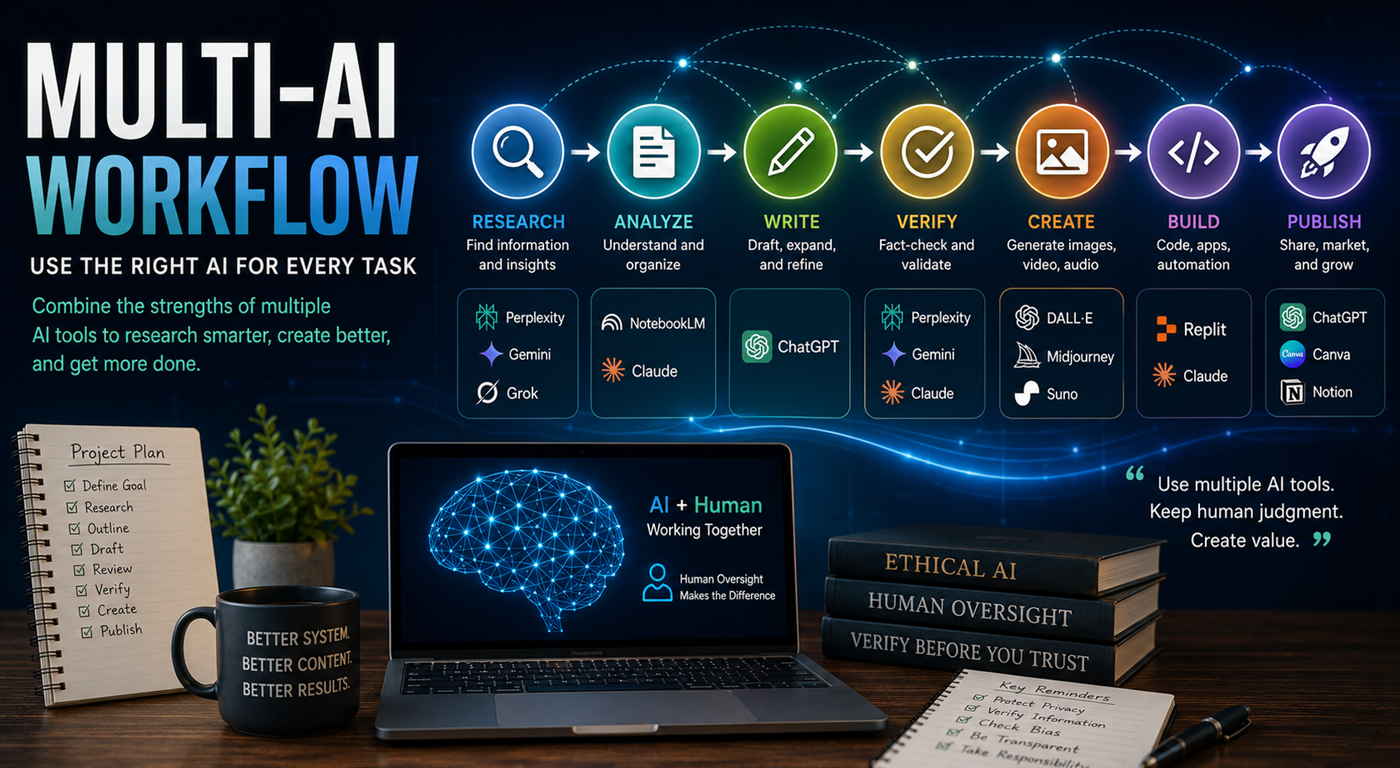
One artificial intelligence platform does not have to do everything. Combine specialized AI tools for research, planning, writing, comparison, verification, image creation, coding, production, and publishing.
A multi-AI workflow is a structured process that uses several artificial intelligence platforms, with each tool assigned to the part of a project it handles best.
One AI system may be excellent at conversation and drafting. Another may be stronger at analyzing long documents. Another may specialize in current research, image generation, coding, music, video, or application development.
Instead of asking one platform to complete every stage, a multi-AI workflow moves information from one specialized tool to another. The human remains responsible for setting the goal, reviewing the results, verifying important information, and deciding what becomes part of the final project.
A well-designed workflow takes advantage of those differences while reducing the risk of relying too heavily on one answer or one platform.
Use research tools for finding information, writing tools for developing content, coding tools for software, and creative tools for images, music, or video.
Compare answers from multiple systems and investigate disagreements before relying on important claims.
Different AI systems may identify different assumptions, examples, risks, opportunities, and possible approaches.
A workflow can continue even when one platform changes, becomes unavailable, limits access, or produces an unsatisfactory answer.
One platform can draft, another can critique, and a third can help verify or reorganize the result.
Assigning each task to the right system can reduce repetition, improve output quality, and shorten the path from idea to finished project.
This process can be adapted for books, articles, courses, websites, business projects, videos, research reports, apps, and educational resources.
Begin by deciding what you are building, who it is for, what problem it should solve, what form the final result should take, and how you will measure success.
Use research-focused tools to identify current information, key terms, authoritative sources, major viewpoints, unanswered questions, and recent developments.
Place trusted reports, notes, transcripts, documents, research findings, and reference materials into a system that can analyze the collection.
Use a strong general-purpose AI assistant to turn the research into an outline, strategy, content map, project plan, chapter structure, production sequence, or development roadmap.
Develop the initial written, visual, technical, or creative version using the system most appropriate for that type of output.
Give the draft to a second AI system and ask it to identify weaknesses, missing ideas, contradictions, unclear sections, factual risks, bias, repetition, or technical problems.
Check dates, statistics, quotations, technical claims, laws, product features, medical statements, financial information, scientific findings, and cited sources.
Rewrite sections in your own voice, remove unsupported claims, make final decisions, test the result, check links, confirm formatting, and take responsibility for the finished work.
Think of each platform as a specialist with a defined responsibility inside the larger project.
Finds current information, identifies useful sources, locates competing viewpoints, and highlights questions requiring verification.
Compares information, identifies patterns, examines assumptions, organizes evidence, and evaluates possible interpretations.
Turns ideas and research into outlines, schedules, project structures, workflows, content maps, and step-by-step plans.
Produces drafts, explanations, summaries, scripts, descriptions, lessons, marketing copy, and other written material.
Challenges assumptions, identifies weaknesses, looks for missing perspectives, and tests the strength of the draft.
Helps isolate factual claims, identify required evidence, compare sources, and flag information that may be outdated or unsupported.
Creates images, visual concepts, presentation layouts, diagrams, covers, promotional graphics, and other visual elements.
Builds or improves websites, apps, tools, calculators, databases, scripts, automation, and interactive experiences.
A book project can move through several AI systems without giving any one system complete control over the final work.
Important research should not depend on a single generated answer. Use several systems to discover information, challenge assumptions, and identify what still requires confirmation.
Ask two or more AI platforms the same carefully written question. Preserve the answers so they can be compared.
Identify where the systems agree, disagree, use different definitions, rely on different dates, or make different assumptions.
Differences often reveal the most important research questions. Ask each system to explain its reasoning and identify supporting evidence.
Confirm the claim using official documentation, original research, government sources, recognized institutions, court records, company filings, or direct statements.
AI tools, laws, product features, prices, regulations, and public events can change. Record when the information was verified.
Clearly label confirmed facts, expert opinions, predictions, assumptions, scenarios, and personal conclusions.
Using several AI platforms can improve a project, but only when information, versions, instructions, and decisions are managed carefully.
Maintain one document containing the project goal, audience, voice, scope, approved facts, terminology, required sections, and final standards.
Keep a record of the sources supporting important claims instead of relying on AI-generated summaries alone.
Use clear filenames or labels such as research draft, outline version, edited draft, fact-checked draft, and final publication version.
Document why claims were accepted, rejected, revised, or removed so later stages do not reintroduce old errors.
Save your preferred tone, formatting rules, audience description, fact-checking requirements, and project standards as reusable prompts.
One person should review the entire project for consistency instead of allowing separate AI systems to create disconnected sections.
Adding platforms that do not provide a clear advantage can create confusion, duplicate work, and increase costs.
Each AI may take the project in a different direction unless the same master brief and audience remain visible.
Several AI systems may repeat the same incorrect information because they learned from similar sources.
Combining several generated answers can multiply contradictions, unsupported claims, repetition, and inconsistent terminology.
Moving content between platforms increases the number of systems receiving the information. Protect confidential and personal data.
A workflow is not responsible when AI systems approve one another without a qualified person reviewing the final result.
You do not need an elaborate system. Begin with three clear roles and add more tools only when the project requires them.
Use a research-focused platform to locate current information, sources, questions, and major viewpoints.
Use a general-purpose assistant to develop the structure, produce the draft, and help refine the project.
Use a second independent system to challenge the draft, identify weaknesses, and isolate claims that require confirmation.
The strongest AI workflow combines specialized platforms with clear human direction. Use each tool for what it does well, compare important answers, verify critical facts, protect private information, and keep human judgment at the center.